
Web browsers - a data portability patchwork

I often hear skepticism that there is no demand for data portability due to lack of consumer awareness. That data portability isn’t that important for switching after all. And that it can only work with sector-wide common standards and governance frameworks in place.
Although not perfect, browser data portability is a compelling case study for busting all of these myths.
Browsers are digital wallets
Browser users – basically everyone – are not a homogenous group.
For many users, the choice and setup of the browser is a deeply personal and personalised experience. Their tabs, bookmarks, favourites, reading lists, extensions and search histories are core to their experience of browsing and consuming online. But for others, the default browser will always do, straight out the box.
Privacy protection is another issue that can elicit a wide range of reactions, including anger and fear, general mistrust, apathy, and more positive value recognition.
Wherever a user sits on these overlapping spectrums, ongoing operational access to sensitive data by the browser can be critical to users’ experience online. For example, even the least engaged browser user may be relieved when their browser recalls their password for their Amazon shopping account. And a privacy conscious user may still be grateful to be offered up their payment card details at the checkout.
This is because browsers are not just a window to the web, with personalisation as an add on. Browsers now also double up as digital wallets, storing critical information that makes our online browsing and shopping experiences more efficient and convenient.
So when people choose to switch browsers – yep, you aren’t reading this on Netscape or Internet Explorer are you – it is important they have the option to take their useful data with them. Engaged users don’t want to start from scratch re-setting all of their bookmarks and personal touches. Nor does the average user want to start searching for their physical wallet every time they need to make a purchase, or resetting complex passwords for each website they return to.
A patchwork of solutions
Browser users don’t need to be aware of the concept of data portability, or be excited by their personal data rights. They just make a few extra clicks as they install and onboard with a new browser. This is how data portability works best: when it blends into the background, serving a higher purpose.
And browser switching is certainly not niche. On desktop devices, the market has tipped to a new winner several times over the last quarter of a century, meaning most people have changed the browser they use on their laptop or desktop computer at some stage. Switching rates have historically been lower for mobile browsers for a host of reasons, but even if just 16% have switched (according to a CMA survey of UK mobile browser users) then we could be talking about a billion people worldwide. And the introduction of choice screens, such as those imposed by the EU’s Digital Markets Act (DMA), are driving up consumer engagement, with browsers such as Opera, Brave and Vivaldi all reporting growth in user numbers since DMA implementation in 2024.
Although browser switching works relatively well, the browser data portability landscape could affectionately be described as a scruffy patchwork: it just about does the job; new patches keep getting added; but some gaps remain and each patch is different from the one before. But that variation doesn’t necessarily seem to matter a great deal. For a given user looking to switch – possibly every few years or less – it just needs to work for them, there, in that context. The fact that a different user switching between two other browsers on a different platform may be getting a completely different experience doesn’t really matter at all.
Desktop vs mobile
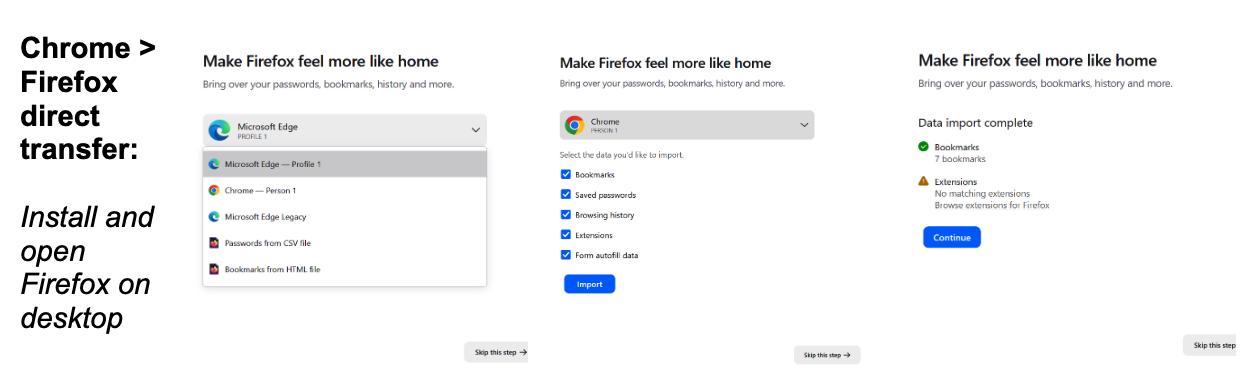
Browser data portability has worked pretty well on desktop for some time. The majority of browsers support the direct passive transfer of browser data without the user needing to handle any files themselves. This means that each browser on desktop is generally able to include a data import feature in their installation setup wizard. This all tends to work pretty seamlessly.
To illustrate, if someone wants to install Firefox on their laptop, they can import their data from Chrome as part of the set up process. After a few clicks (see screenshots below), Firefox is essentially able to reach into your local files and extract the data it needs.
On mobile devices, the desktop method for direct transfers isn’t possible due to browser sandboxing. But the options for moving data between browsers are increasing and improving on mobile, with very little fanfare.
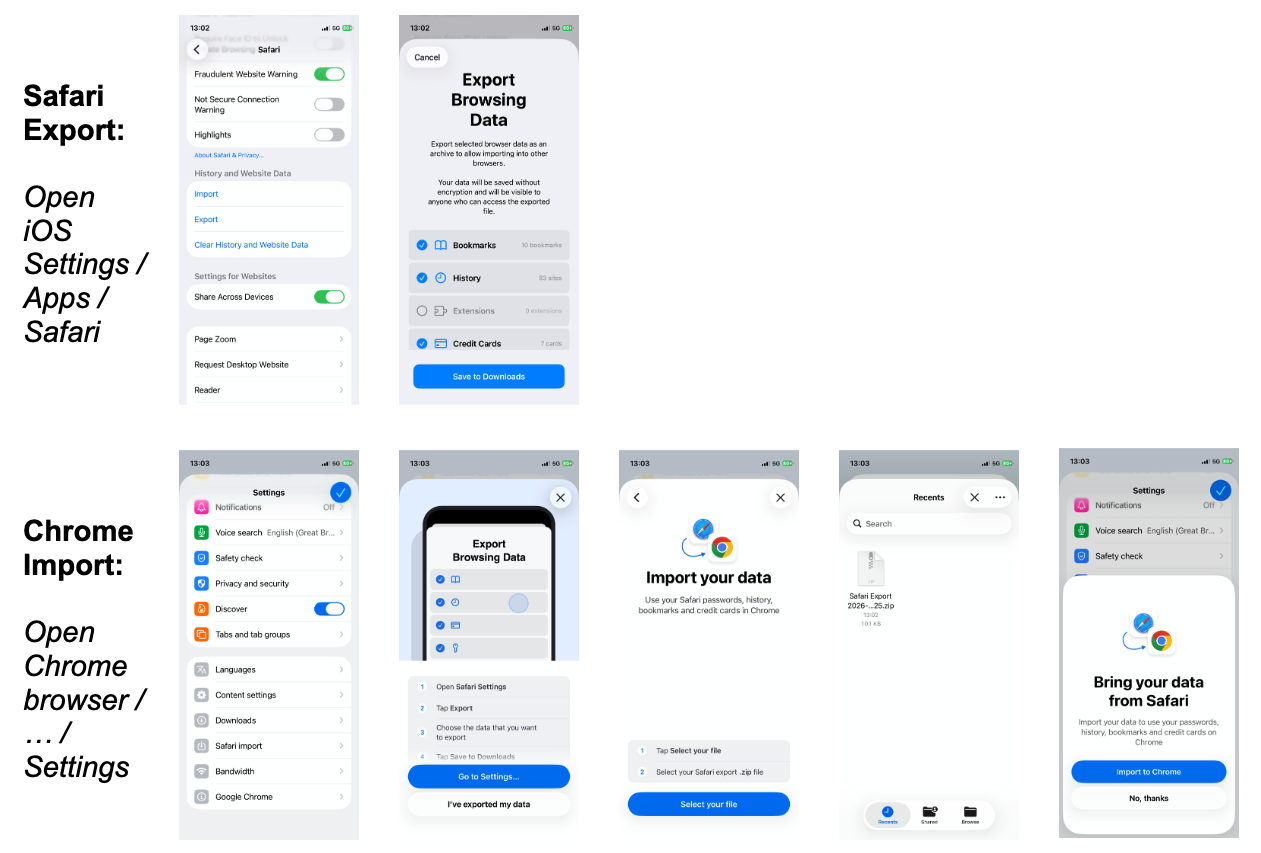
For example, on the iPhone, users can export a zip file of their Safari data to their files, through a relatively quick and seamless UX accessed via the device settings. But as I have written before, data portability takes two. And we are now starting to see alternative browsers on iOS develop the necessary import functionality, including Chrome in January 2026, and Vivaldi last month.
The user journeys for the Safari exports and the alternative browser guided imports are pretty slick if you know where to look, and the transfer includes (subject to user choice) the full spectrum of useful data including bookmarks, history, passwords and credit card details.
There are further developments to suggest direct transfers will be supported on mobile in time. Google’s Data Portability API – yet to be fully explored by rival browsers to my knowledge – enables one off and ongoing direct transfers of a user’s Chrome data to third-party services, including history, bookmarks, reading lists and more. Apple has also recently announced a tool that will facilitate direct transfers of similar data scopes from Safari.
Security vs usefulness
Passwords and credit card details may just be up there with the most sensitive and dangerous data to expose to security threats. It also happens to be up there as some of the most practically useful information to share with your web browser. So there is an inherent tradeoff between the usefulness and security of browser data portability.
The market seems to have naturally converged towards a tiered approach that supports the direct browser-to-browser transfer of less sensitive data such as bookmarks and histories, then with some additional user action to move more sensitive data such as passwords and credit card information. Whether it is the user needing to export data to files before manually importing, or interacting with a separate password management service, these added steps create friction for the user and affect the user experience. But this friction is also a positive trigger for users to think carefully about their choices and be certain that they know and trust the destination.
A tiered approach appears logical to me, and is consistent with the approach we have taken to our Data Trust Registry, which has different requirements depending on data sensitivity.
A patchwork that works
Browser vendors have done a decent job at enabling their users to take their data with them, pulling together this patchwork of transfer solutions without sector wide requirements or an overarching coordination body. It may not be perfect or standardised, and there will continue to be some tensions between security and user experience to work through, but that doesn’t seem to matter too much.
The fact is, data portability really does support browser switching in its purest form, and it works pretty well.
I’m looking forward to continuing down this rabbit hole I recently stumbled into, to see what role DTI might play in helping the industry tackle any future challenges as they arise.